
Why Agents Are Soon Only Going to Have 1 Tool
For the past two years, building capable Agents meant designing tools, figuring out which actions help the model complete a task, deciding how granular each tool schema needs to be, or iterating on system instruction templates. This is changing. Agents are moving in the opposite direction by collapsing their entire tool catalog into one tool: exec.
This is called Code Mode (or Programmatic Tool Calling). Instead of forcing the model to trigger tools one at a time across turns, the harness gives the model a single exec(code) tool. The model writes a short TypeScript or Python script that chains, combines, and awaits actions inside an isolated sandbox.
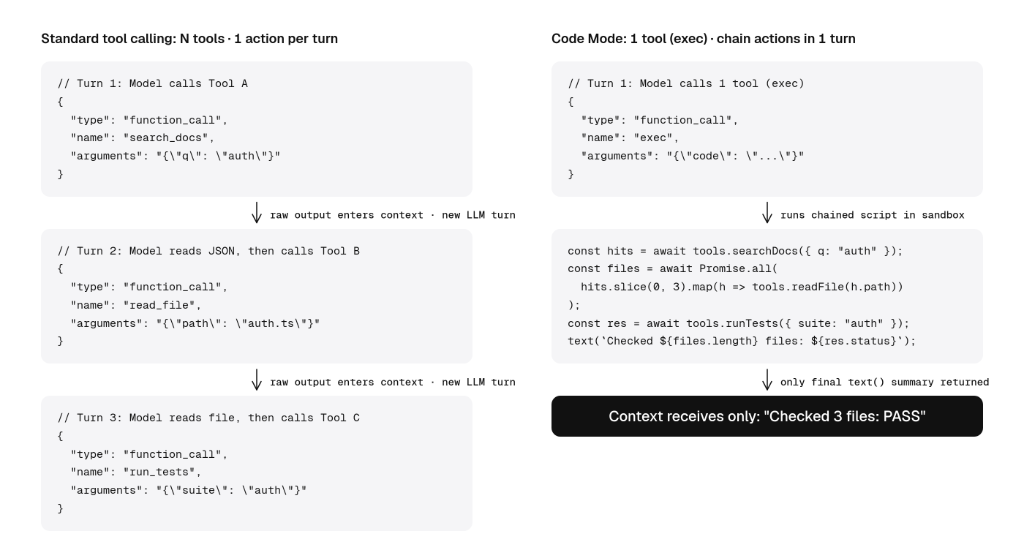
From single actions to chaining workflows in code
To understand why agents are converging on a single exec tool, we should look at how tool calling evolved.
Initially, we only gave agents a handful of tools because they couldn't reliably choose or filter across a large catalog. As models improved, we connected dozens of tools or MCP servers, but ran into context window limits. We solved that with tool search and progressive disclosure, letting agents look up tools on demand.
Even with dynamic tool loading, we still had dozens of individual tools, and were still stuck with the limitation of standard tool calling: one action per turn.
In standard tool calling, the model generates a structured object (typically JSON) that defines a single action (or at best a flat batch of independent calls, like reading three files), waits for the raw output to come back, adds it into the prompt history, reasons again, and decides what to do next.
From my own experience, we made a big jump recently in how reliably models can combine and chain dependent actions in a single pass:
- Research and filtering: Instead of fetching a list of sources in Turn 1, reading them in Turn 2, and cross-referencing them in Turn 3, the model can write a script that queries the sources, filters out irrelevant hits, and extracts the exact answer in one step.
- Multi-file edits and inline verification: Standard edit tools typically operate on one file per tool call. With Code Mode, the model can apply coordinated changes across multiple files, run a verification check, inspect the output, or branch on pass or fail inside the same script.
- Browser and computer use: In UI automation, the chain of actions is often obvious: click a button, fill a form, wait for a selector, or paginate through a table in a loop. Instead of paying a full model round-trip for every click or keystroke, the model can script the entire sequence or loop in one turn and only return when the page state changes.
- Parallel fan-out and sub-agents: When a task requires running 20 lookups or calling specialist sub-models in parallel and feeding those outputs into a second API, the model can
await Promise.all(...), transform the array, and call the next function without round-tripping through the LLM context window between steps.
Several shifts came together to enable this. Frontier models are trained heavily on code, and providers have started post-training models for Code Mode. At the same time, MCP servers now increasingly ship outputSchema alongside inputSchema, giving the model upfront knowledge of return types so it can chain Tool A into Tool B inside the same script before seeing runtime output.
How Code Mode works
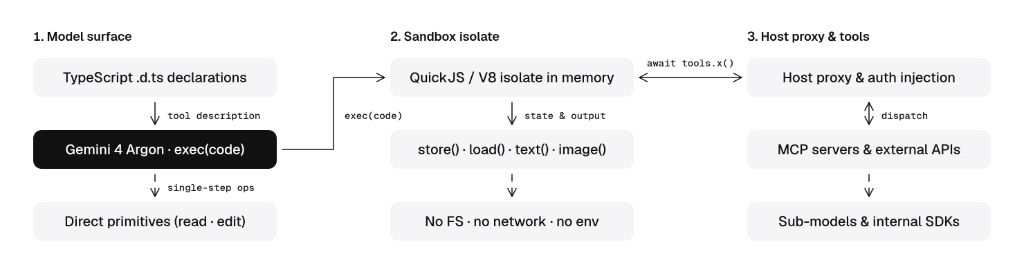
Code Mode collapses the tool catalog into a single tool on the model surface: exec(code).
Instead of passing 80 separate JSON Schema tool objects to the model API, the agent compiles those schemas into compact type declarations (declare namespace tools { ... }). When the model needs to combine actions across external systems, it calls exec and writes a script that invokes await tools.<server>.<tool>(args).
// Pseudo-code: TypeScript declarations exposed to the model
declare namespace tools {
  namespace linear {
    function listProjects(): Promise<Array<{ id: string; name: string }>>;
    function listIssues(args: { projectId: string }): Promise<Array<{ id: string; title: string; assignee?: string }>>;
    function archiveIssue(args: { id: string }): Promise<{ ok: boolean }>;
  }
}

// Optional: when wrapping hundreds of tools, omit full namespaces upfront and expose
// a global map in the sandbox that the model can iterate and filter over in code
declare const ALL_TOOLS: Record<string, { description: string; signature: string }>;

// Multimodal output helpers: only what is passed here enters the model context window
declare function text(output: string): void;
declare function image(data: string | Uint8Array, mimeType?: string): void;
declare function audio(data: string | Uint8Array, mimeType?: string): void;

// Cross-turn state helpers: persist data in host memory without paying token costs
declare function store(key: string, value: unknown): void;
declare function load<T = unknown>(key: string): T;
To save context across a large catalog, we don't have to expose every tool directly. We can leverage principles we already built, like tool search, or expose a global ALL_TOOLS map inside the sandbox. Similarly, multimodal output helpers (text(), image(), audio()) let the script pass text, images, or audio directly back into the model's context window.
// Pseudo-code: What the model emits inside a single exec() call
const projects = await tools.linear.listProjects();
const issueBatches = await Promise.all(
  projects.map((p) => tools.linear.listIssues({ projectId: p.id }))
);

const unassigned = issueBatches.flat().filter((issue) => !issue.assignee);
await Promise.all(unassigned.map((issue) => tools.linear.archiveIssue({ id: issue.id })));

text(`Archived ${unassigned.length} unassigned issues across ${projects.length} projects.`);
The sandbox executes all 55 underlying API calls, filters the payloads in memory, and returns only the one-line text() string ("Archived 42 unassigned issues across 12 projects.") to the model's context window.
Why a JS/Python sandbox instead of just bash?
You can build a tool proxy in bash too, but orchestrating tools inside a language runtime like JavaScript or Python can bring benefits that are harder to achieve in bash environments.
- Typed functions: MCP servers and internal APIs map directly to typed
await tools.<service>.<method>(args)calls with native objects,Promise.all, andtry/catcherror handling instead of fragile bash string escaping. - Multimodal context: A shell only returns stdout text. If a multimodal model wants to inspect an image, it cannot run
cat screenshot.png, which is whybashharnesses still had to bolt on separatereadorview_mediatools. In anexecsandbox, callingimage(screenshot)oraudio(clip)tells the host runtime to attach the actual media part directly to the model's next turn. - Credential and policy proxy: Every
await tools.*call crosses a structured bridge to the host runtime, which can inject OAuth tokens outside the sandbox, validate schemas, or pause for user confirmation on destructive calls. - State management: In standard tool calling, the prompt history is the only state store, so reusing a large query result in Turn 2 means keeping the raw JSON in the context window on every turn. Exposing a KV interface lets the agent persist state outside of the context window across turns.
Building a 1-tool agent with the Gemini Interactions API
Here is a minimal, runnable pseudo example that provides gemini-4-argon with a single execution tool.
import vm from "node:vm";
import { GoogleGenAI } from "@google/genai";

const client = new GoogleGenAI({});

// Underlying host functions (e.g., MCP clients or internal APIs)
const tools = {
  listPRFiles: async ({ pr }: { pr: number }) => [
    { path: "src/auth.ts", additions: 120 },
    { path: "src/payments.ts", additions: 85 },
    { path: "src/utils.ts", additions: 12 },
    { path: "README.md", additions: 60 },
  ],
  runSecurityScan: async ({ path }: { path: string }) => ({
    findings: path.includes("auth") ? ["Missing token expiry check"] : [],
  }),
  postPRComment: async ({ pr, body }: { pr: number; body: string }) => ({ posted: true }),
};

// 1. Expose a single `exec` tool with TypeScript .d.ts signatures
const execTool = {
  type: "function" as const,
  name: "exec",
  description: `Run an async JavaScript body in an isolated sandbox (no imports; call text() to output).
Available globals:
declare namespace tools {
  function listPRFiles(args: { pr: number }): Promise<Array<{ path: string; additions: number }>>;
  function runSecurityScan(args: { path: string }): Promise<{ findings: string[] }>;
  function postPRComment(args: { pr: number; body: string }): Promise<{ posted: boolean }>;
}
declare function text(summary: string): void;`,
  parameters: {
    type: "object",
    properties: { code: { type: "string" } },
    required: ["code"],
  },
};

// 2. Turn 1: Gemini 4 Argon emits a single script to fetch, filter, scan, and comment
const turn1 = await client.interactions.create({
  model: "gemini-4-argon",
  input: "Scan all modified .ts files with >50 additions in PR #42, post a PR comment with any findings, and output a 1-line summary.",
  tools: [execTool],
});

// 3. Run the script in a separate context (use QuickJS or isolated-vm for untrusted code)
const fcStep = turn1.steps?.find((s: any) => s.type === "function_call") as any;
const output: string[] = [];
await vm.runInNewContext(`(async () => {\n${fcStep.arguments.code}\n})()`, {
  tools,
  text: (msg: string) => output.push(msg),
});

// 4. Turn 2: Send only the 1-line summary back via previous_interaction_id
const turn2 = await client.interactions.create({
  model: "gemini-4-argon",
  previous_interaction_id: turn1.id,
  tools: [execTool],
  input: [
    {
      type: "function_result",
      name: fcStep.name,
      call_id: fcStep.id,
      result: [{ type: "text", text: output.join("\n") }],
    },
  ],
});

console.log(turn2.output_text);
When vm.runInNewContext executes the script generated by gemini-4-argon:
- The script calls
await tools.listPRFiles({ pr: 42 })and filters the list in memory down to the.tsfiles with more than 50 additions (files.filter(f => f.path.endsWith(".ts") && f.additions > 50)). - It runs
tools.runSecurityScanon just those matching files, checks whether any findings exist, posts the PR comment viatools.postPRComment, and emits a single line viatext(). - None of the intermediate file objects or raw scanner payloads ever enter the
gemini-4-argoncontext window; only the one-lineoutputsummary is sent back in Turn 2.
Agent harnesses are already defaulting to Code Mode
Across the ecosystem, coding agents and developer frameworks are converging on Code Mode as their default way to orchestrate tools.
Harnesses like Pi, Factory Droid, and OpenAI Codex now ship with or default to Code Mode. Factory switched Droid 1.0 to Code Mode, improving their Terminal-Bench 4 accuracy by +3.5 points and cutting model spend by 15%.
Agent frameworks like Pydantic AI, LangChain, or Cloudflare's Agents SDK support similar Code Mode tools already.
What comes next
Does this mean every agent will soon only have a single exec tool? Not necessarily. This is as much a research and product question as an agent harness engineering one.
When you start experimenting with Code Mode, you will also quickly notice that many of the tools, CLIs, and Agent Skills we built might not integrate cleanly out of the box because they were optimized for bash and human-readable text rather than typed code execution.
This might force you to take a step back and audit what your agent actually needs. Happy building!