
How to correctly use MCP servers with your AI Agents
MCP servers are not dead. But blindly enabling them bloats your context, which leads to higher cost and worse performance. Unlike Agent Skills, MCP servers don't come with progressive disclosure out of the box. It is your responsibility to select the tools needed for the task at hand. Here are two proven patterns on how to correctly use MCP servers and avoid the bloat.
1. Explicit MCP Servers: Inline Tool Injection
MCP servers stay opt-in. Servers are referenced in your prompt with an @mention, and the agent resolves, fetches, and injects the tools before the model request.
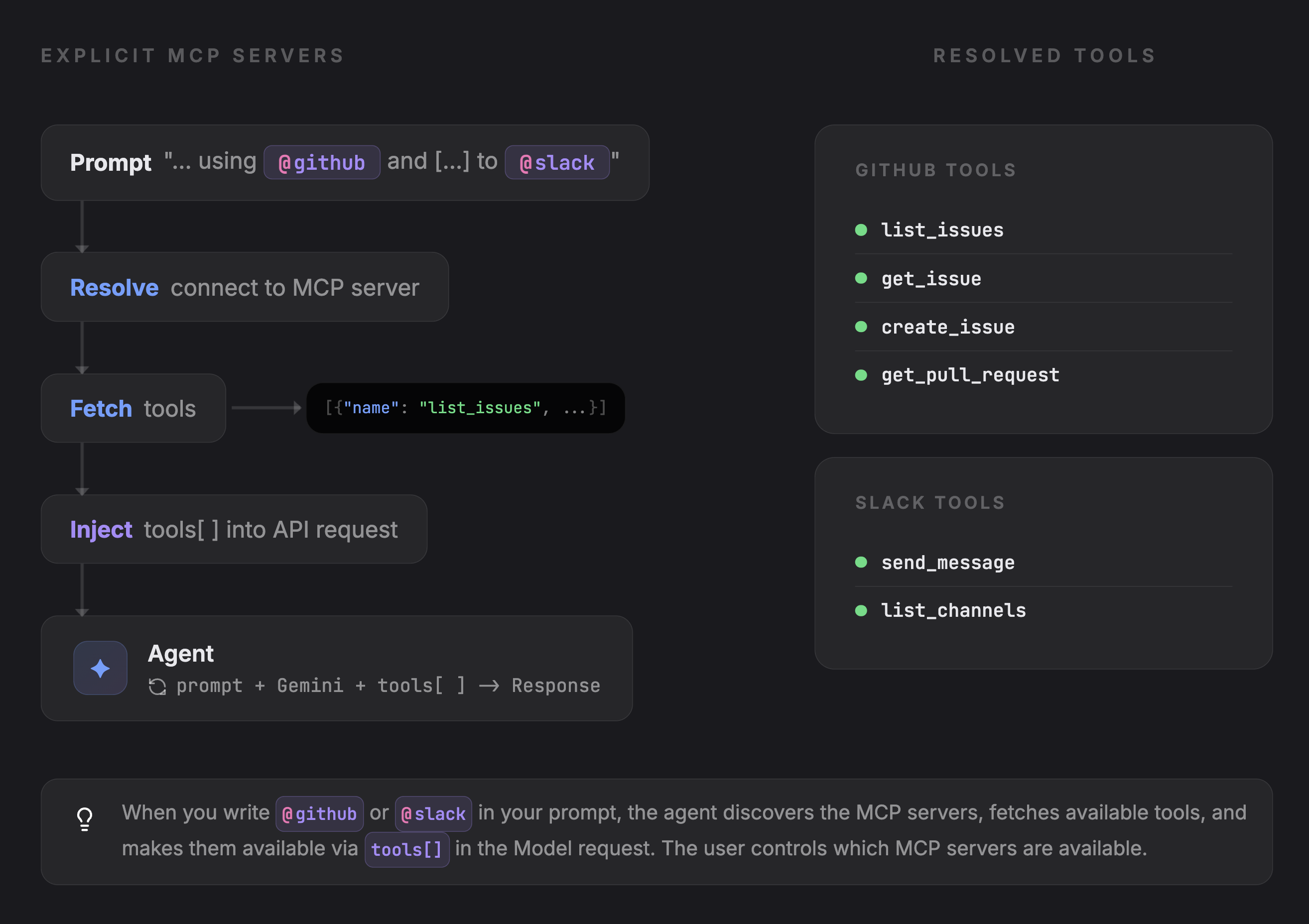
Writing @github or @slack in a prompt triggers the agent to:
- Resolve the
@mentionto a registered MCP server URL - Fetch tool schemas from the server
- Inject them into the
tools[]array of the API request - Forward everything to the model, which decides what to call
Nothing loads unless requested. The tool surface stays small.
// Pseudo-code
async function handlePrompt(prompt: string) {
  // Detect @mentions in the prompt
  const mentions = parseMentions(prompt); // ["@github", "@slack"]

  // Resolve each mention to an MCP server
  const servers = mentions.map(m => mcpServers.resolve(m));

  // Fetch tool schemas from each server
  const mcpTools = await Promise.all(
    servers.map(s => s.listTools())
  );

  // Inject into the API request alongside native tools
  const response = await llmCall({
    prompt,
    tools: [...nativeTools, ...mcpTools],
  });

  // handle response, call tools, etc ...
}
When to use this: MCP usage is occasional and user-driven. Someone asks a question that needs Slack or GitHub data, they @mention the server, and it gets pulled in for that request only. Keeps costs low and avoids tool noise on tasks that don't need external integrations.
2. Subagent MCP Servers
MCP servers are declared in subagents definition and automatically available at runtime alongside native tools like read_file or run_command.
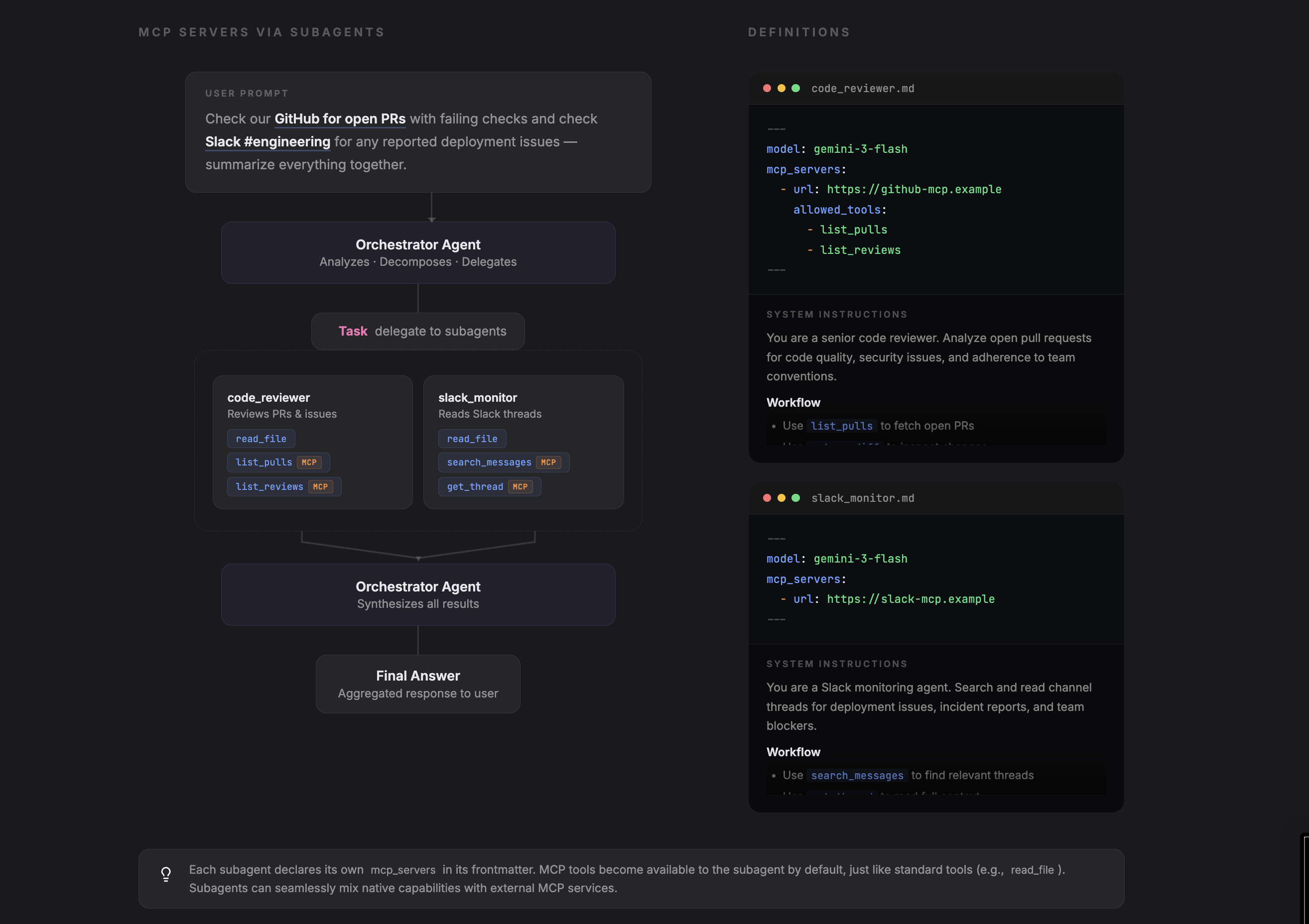
Each subagent has its own configuration that declares its model, tools,... and optional MCP servers.
You can scope MCP servers to specific tools using allowed_tools.
# Pseudo-code: code_reviewer.md
---
name: code-reviewer
model: gemini-3-flash
mcp_servers:
  - url: https://github-mcp.example
    allowed_tools:
      - list_pulls
      - list_reviews
      - get_diff
---
You are a code reviewer. Review open PRs...
The main agent registers subagents. When invoked, each subagent connects to its declared MCP servers and merges those tools with native ones.
// Pseudo-code

// Register subagents as tools for the orchestrator
const codeReviewer = createSubagent("./agents/code_reviewer.md");
const slackMonitor = createSubagent("./agents/slack_monitor.md");

async function handlePrompt(prompt: string) {

  // pre-processing ...

  const response = await llmCall({
    prompt,
    tools: [...nativeTools, codeReviewer, slackMonitor],
  });

  // handle response, call tools, etc ...
}
allowed_tools gives you least-privilege scoping without forking the MCP server.
When to use this: The use case dictates the tools. A code review agent always needs GitHub, a support agent always needs Zendesk. The MCP servers are part of what the agent is, not something a user opts into per request. allowed_tools keeps each agent scoped to what it actually needs.