
How Agents Manage Other Agents: Four Subagents Patterns in 2026
Last year I wrote about the rise of subagents and why isolating tasks into focused agents with their own context, tools, and instructions improves reliability. That post covered what subagents are and why you want them. Since then, models have gotten better at planning, tool use, and multi-step instructions. That opens up patterns that were previously too fragile: agents managing pools of persistent workers, or agents messaging each other directly.
Here are four patterns, ordered by the level of control the main agent has over the subagent lifecycle.
1. Inline Tool: Subagent as a Function Call
The simplest pattern. The main agent calls a tool that spawns a subagent and returns the result as the tool response. From the main agent's perspective, calling a subagent is identical to calling read_file or run_command.
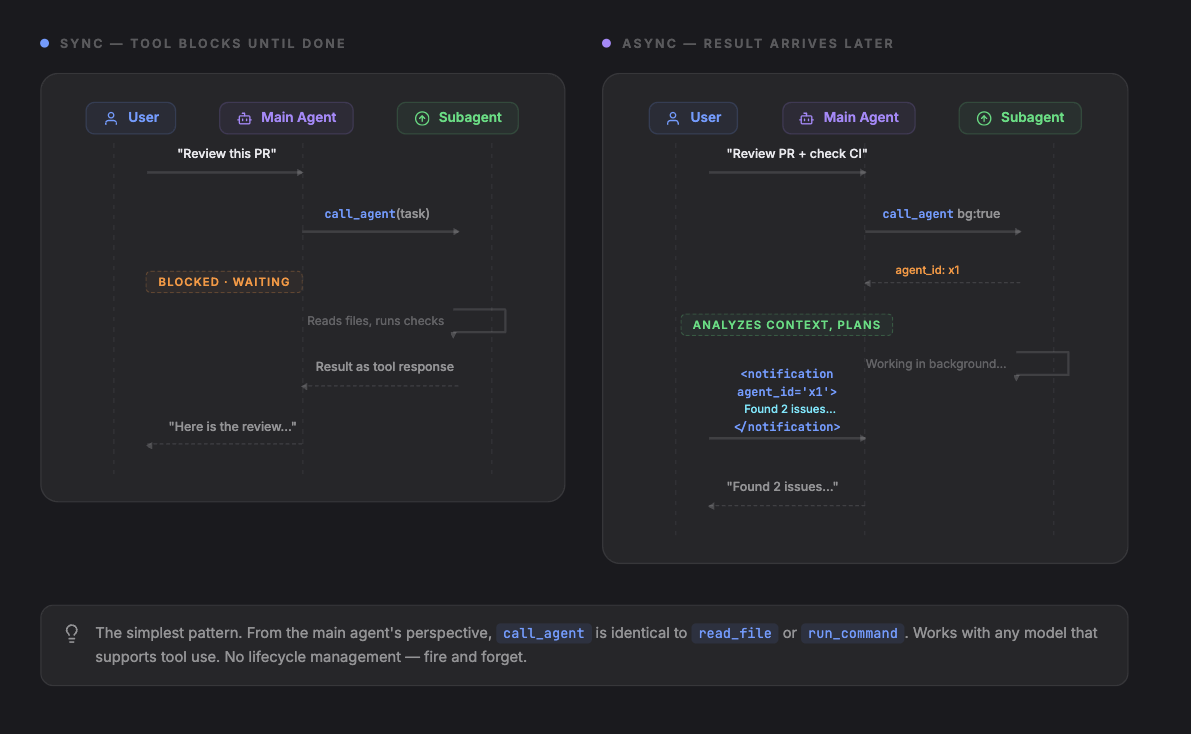
The main agent has a tool, e.g. call_agent. It sends a task, gets a result. The subagent runs in its own context with its own tools and instructions. The main agent never manages the subagent's lifecycle directly.
[
  { "role": "user", "content": "Review PR #42 for security issues" },
  { "role": "assistant", "tool_calls": [
    { "name": "call_agent", "arguments": { "task": "Review PR #42 for security issues. Focus on auth changes.", "agent": "security-reviewer", "tools": ["read_file", "search_code"] } }
  ]},
  { "role": "tool", "name": "call_agent", "content": "Found 2 issues: 1) Auth token not validated in /api/users endpoint. 2) Session cookie missing HttpOnly flag in login handler." },
  { "role": "assistant", "content": "The review found 2 security issues..." }
]
This pattern has a sync/async distinction at the tool level, because the tool itself can either block or return immediately:
Sync (above): The tool call blocks. The main agent's turn is paused until the subagent finishes. The result arrives as a normal tool response.
Async: The tool returns immediately with an agent ID. The subagent's result is injected into the conversation as a notification message when it finishes. The main agent can do other tool calls before the result arrives.
[
  { "role": "user", "content": "Review PR #42 and also check the CI logs" },
  { "role": "assistant", "tool_calls": [
    { "name": "call_agent", "arguments": { "task": "Review PR #42 for security issues", "agent": "security-reviewer", "background": true } },
    { "name": "read_file", "arguments": { "path": "ci/logs/latest.txt" } }
  ]},
  { "role": "tool", "name": "call_agent", "content": "agent_id: agent-x1. Running in background." },
  { "role": "tool", "name": "read_file", "content": "Build passed. 142 tests green." },
  { "role": "assistant", "content": "CI looks clean. Waiting for the security review..." },
  { "role": "user", "content": "<notification agent_id='agent-x1' status='completed'>Found 2 issues: ...</notification>" },
  { "role": "assistant", "content": "The security review found 2 issues..." }
]
In sync, the tool response contains the result. In async, the tool response contains an ID, and the result arrives later as an injected user message.
When to use this: Self-contained work. Research lookups, code reviews, file analysis, test generation. Most subagent use cases start and stay here.
Limitations: Works with any model that supports tool use, including smaller and cheaper ones. Results arrive as a single tool response (sync) or as an injected notification message (async). No way to send follow-up instructions, check progress, or cancel early. If the subagent misunderstands the task, you find out when the result comes back.
2. Fan-Out: Spawn Agents and Wait for Results
The main agent spawns subagents and collects results using a wait_agent tool. Unlike the inline tool, spawning and collecting are separate steps. spawn_agent always returns immediately. The model decides what to do next: call wait_agent right away, do its own work first, or spawn more agents before waiting.
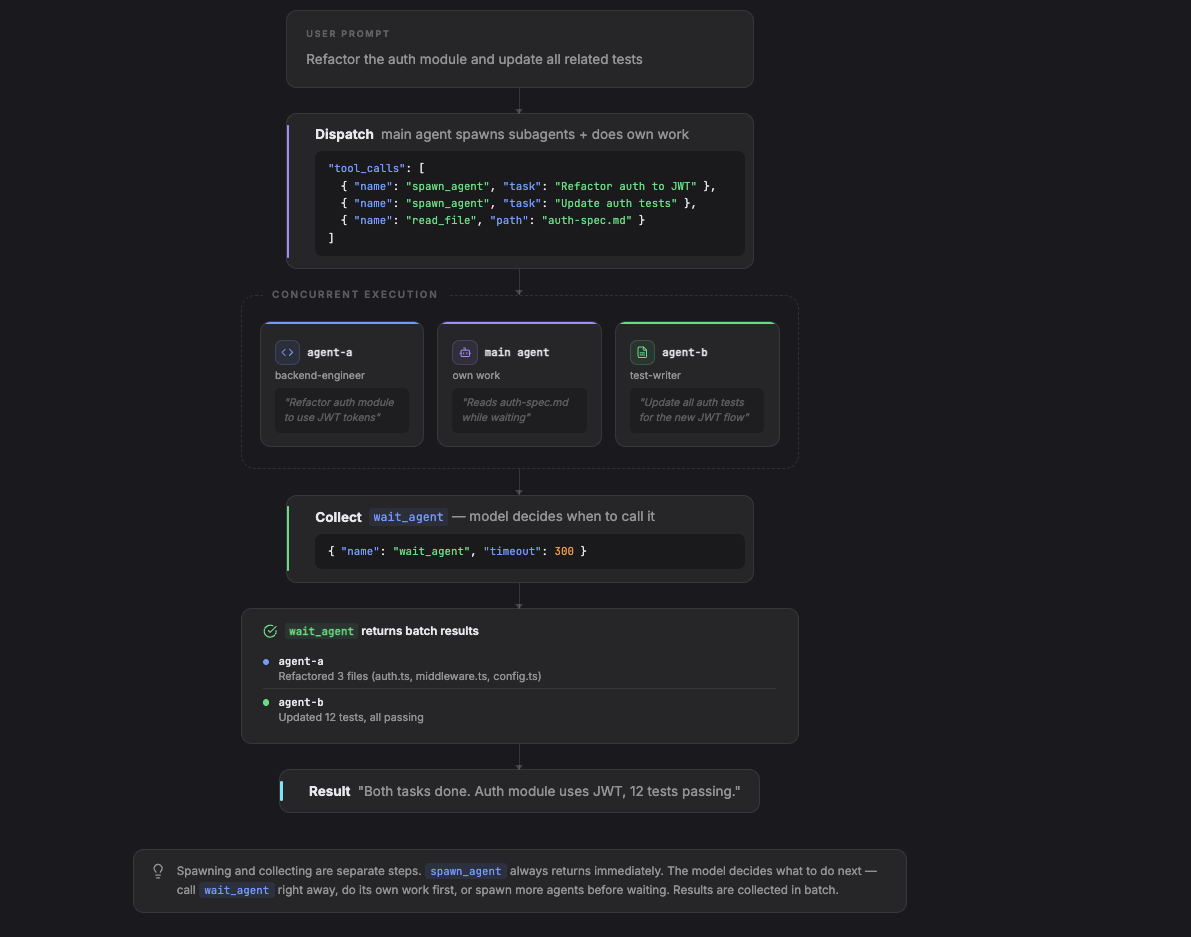
Two tools: spawn_agent dispatches work and returns immediately with an ID. wait_agent blocks until one or more agents finish.
The model controls sequencing. It can spawn agents and call wait_agent immediately (effectively synchronous), or interleave its own work first:
[
  { "role": "user", "content": "Refactor the auth module and update all related tests" },
  { "role": "assistant", "tool_calls": [
    { "name": "spawn_agent", "arguments": { "task": "Refactor the auth module to use JWT tokens", "agent": "backend-engineer" } },
    { "name": "spawn_agent", "arguments": { "task": "Update all auth-related tests for the new JWT flow", "agent": "test-writer" } },
    { "name": "read_file", "arguments": { "path": "docs/auth-spec.md" } }
  ]},
  { "role": "tool", "name": "spawn_agent", "content": "Spawned agent-a (backend-engineer). Running." },
  { "role": "tool", "name": "spawn_agent", "content": "Spawned agent-b (test-writer). Running." },
  { "role": "tool", "name": "read_file", "content": "# Auth Spec\nJWT tokens with RS256..." },
  { "role": "assistant", "content": "I've kicked off both tasks. The auth spec confirms we should use RS256." },
  { "role": "assistant", "tool_calls": [{ "name": "wait_agent", "arguments": { "timeout": 300 } }]},
  { "role": "tool", "name": "wait_agent", "content": "2 agents completed:\n- agent-a: Refactored 3 files (auth.ts, middleware.ts, config.ts)\n- agent-b: Updated 12 tests, all passing" },
  { "role": "assistant", "content": "Both tasks are done. The auth module now uses JWT..." }
]
The model spawned two agents and read a file in the same tool call, then decided to wait. A different model might call wait_agent immediately after spawning, or do several reads first. The tool surface is the same; the model decides the interleaving.
The difference from Pattern 1: the model controls when to collect. It can spawn 5 agents in parallel, do its own file reads, then call wait_agent. wait_agent can act as a global mailbox that wakes up on subagent completion and returns all available results.
When to use this: Multiple independent tasks that can run concurrently. The main agent does not need intermediate results from one subagent to start another.
Limitations: The model needs to correctly decide when to wait. A model that calls wait_agent immediately after every spawn gets no benefit over Pattern 1. The value depends on the model's ability to interleave its own work between spawn and wait. Results are collected in batch via wait_agent, which returns all completed agent outputs since the last call. Still fire-and-forget: no way to send follow-up instructions or course-correct mid-task to subagents.
3. Agent Pool: Persistent Agents with Messaging
The main agent spawns long-lived subagents and communicates with them through messages. Agents persist across interactions. The main agent can send follow-up instructions, check status, and coordinate work between agents.
This requires a richer tool surface: spawn_agent, send_message, wait_agent, list_agents, kill_agent.
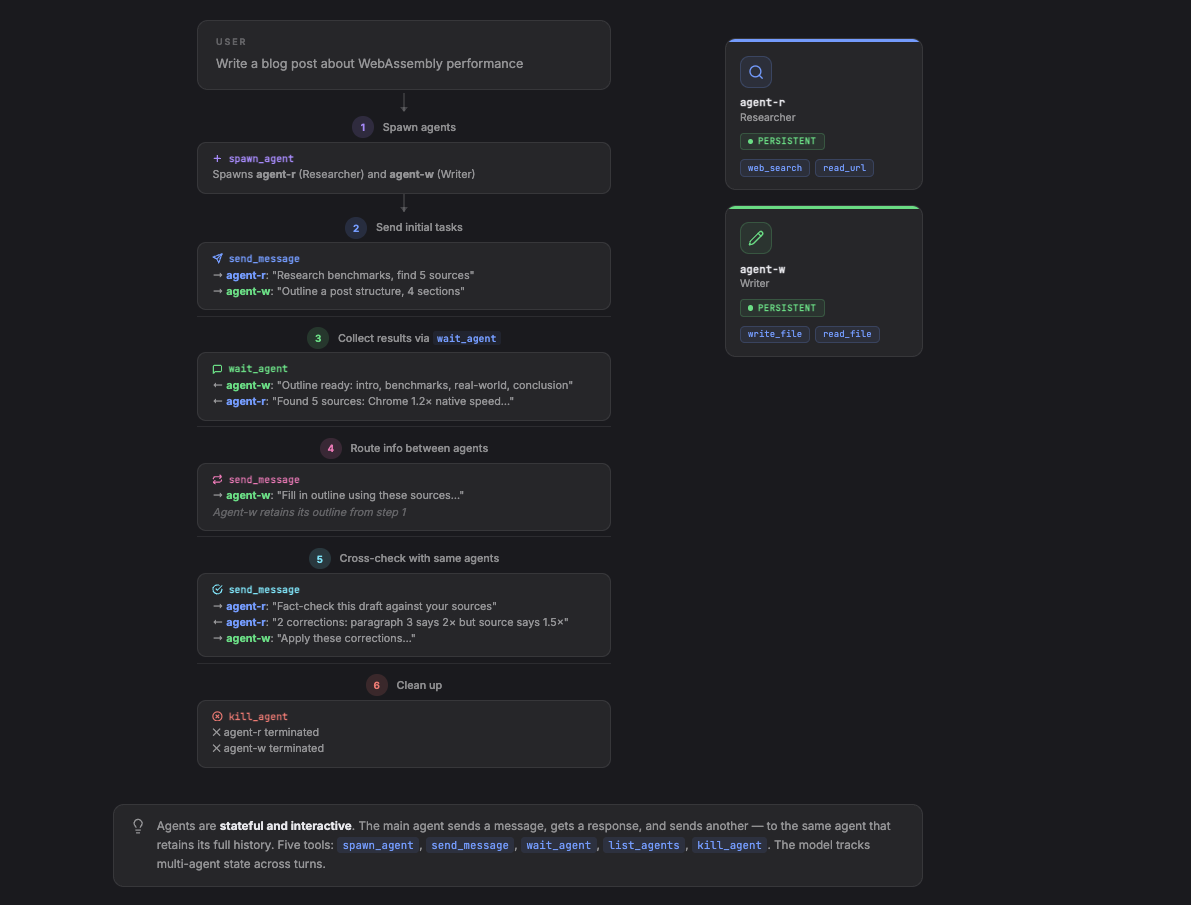
Unlike Pattern 2, agents here are stateful and interactive. The main agent sends a message, gets a response, and sends another message to the same agent. The agent retains its full conversation history. This supports multi-step workflows where the main agent coordinates between specialists.
The model controls whether it works with one agent at a time (sequential) or messages multiple agents between waits (parallel). It can send to the researcher and writer simultaneously, or wait for the researcher first:
[
  { "role": "user", "content": "Write a blog post about WebAssembly performance" },

  { "role": "assistant", "tool_calls": [
    { "name": "spawn_agent", "arguments": { "role": "researcher", "tools": ["web_search", "read_url"] }},
    { "name": "spawn_agent", "arguments": { "role": "writer", "tools": ["write_file", "read_file"] }}
  ]},
  { "role": "tool", "name": "spawn_agent", "content": "Spawned agent-r (researcher)" },
  { "role": "tool", "name": "spawn_agent", "content": "Spawned agent-w (writer)" },

  { "role": "assistant", "tool_calls": [
    { "name": "send_message", "arguments": { "to": "agent-r", "message": "Research WebAssembly performance benchmarks. Find 5 sources with concrete numbers." } },
    { "name": "send_message", "arguments": { "to": "agent-w", "message": "Outline a blog post structure about WebAssembly performance. 4 sections." } }
  ]},
  { "role": "tool", "name": "send_message", "content": "Delivered to agent-r" },
  { "role": "tool", "name": "send_message", "content": "Delivered to agent-w" },

  { "role": "assistant", "tool_calls": [{ "name": "wait_agent", "arguments": {} }]},
  { "role": "tool", "name": "wait_agent", "content": "agent-w responded: Outline ready: intro, benchmarks, real-world, conclusion" },

  { "role": "assistant", "tool_calls": [{ "name": "wait_agent", "arguments": {} }]},
  { "role": "tool", "name": "wait_agent", "content": "agent-r responded: Found 5 sources: 1) Chrome benchmark shows 1.2x native speed..." },

  { "role": "assistant", "tool_calls": [{ "name": "send_message", "arguments": { "to": "agent-w", "message": "Fill in your outline using these sources: 1) Chrome benchmark shows 1.2x native speed..." } }]},
  { "role": "tool", "name": "send_message", "content": "Delivered to agent-w" },

  { "role": "assistant", "tool_calls": [{ "name": "wait_agent", "arguments": {} }]},
  { "role": "tool", "name": "wait_agent", "content": "agent-w responded: Draft complete. Title: 'WebAssembly Is Faster Than You Think'..." },

  { "role": "assistant", "tool_calls": [{ "name": "send_message", "arguments": { "to": "agent-r", "message": "Fact-check this draft against your sources: 'WebAssembly Is Faster Than You Think'..." } }]},
  { "role": "tool", "name": "send_message", "content": "Delivered to agent-r" },

  { "role": "assistant", "tool_calls": [{ "name": "wait_agent", "arguments": {} }]},
  { "role": "tool", "name": "wait_agent", "content": "agent-r responded: 2 corrections: paragraph 3 cites 2x speed but source says 1.5x..." },

  { "role": "assistant", "tool_calls": [
    { "name": "send_message", "arguments": { "to": "agent-w", "message": "Apply these corrections: paragraph 3 should say 1.5x not 2x..." } },
    { "name": "kill_agent", "arguments": { "agent_id": "agent-r" }}
  ]},
  { "role": "tool", "name": "send_message", "content": "Delivered to agent-w" },
  { "role": "tool", "name": "kill_agent", "content": "agent-r terminated" },

  { "role": "assistant", "content": "Here is the final post..." }
]
agent-r is messaged twice (research, then fact-check) and retains its sources from the first task. The model sent work to both agents in parallel at the start, then coordinated sequentially for the fact-check. A different model might serialize everything. The tools are identical; the model controls the orchestration.
Results arrive per-message via wait_agent. Each call to wait_agent returns the next agent response, so the main agent processes results incrementally and can adjust its next message based on what came back.
When to use this: Multi-step workflows where agents need to collaborate. The main agent routes information between specialists.
Limitations: The main agent must track multiple agent states, decide when to send follow-ups vs wait, and route information correctly. Smaller models lose track of which agent has which context, or forget to call kill_agent when done. Frontier models might handle 2-4 agents okayish.
4. Teams: Agents Talk to Each Other
Agents message each other directly without going through the main agent. The main agent sets up the team, defines roles, and steps back. Agents coordinate among themselves using direct messaging or a shared mailbox.
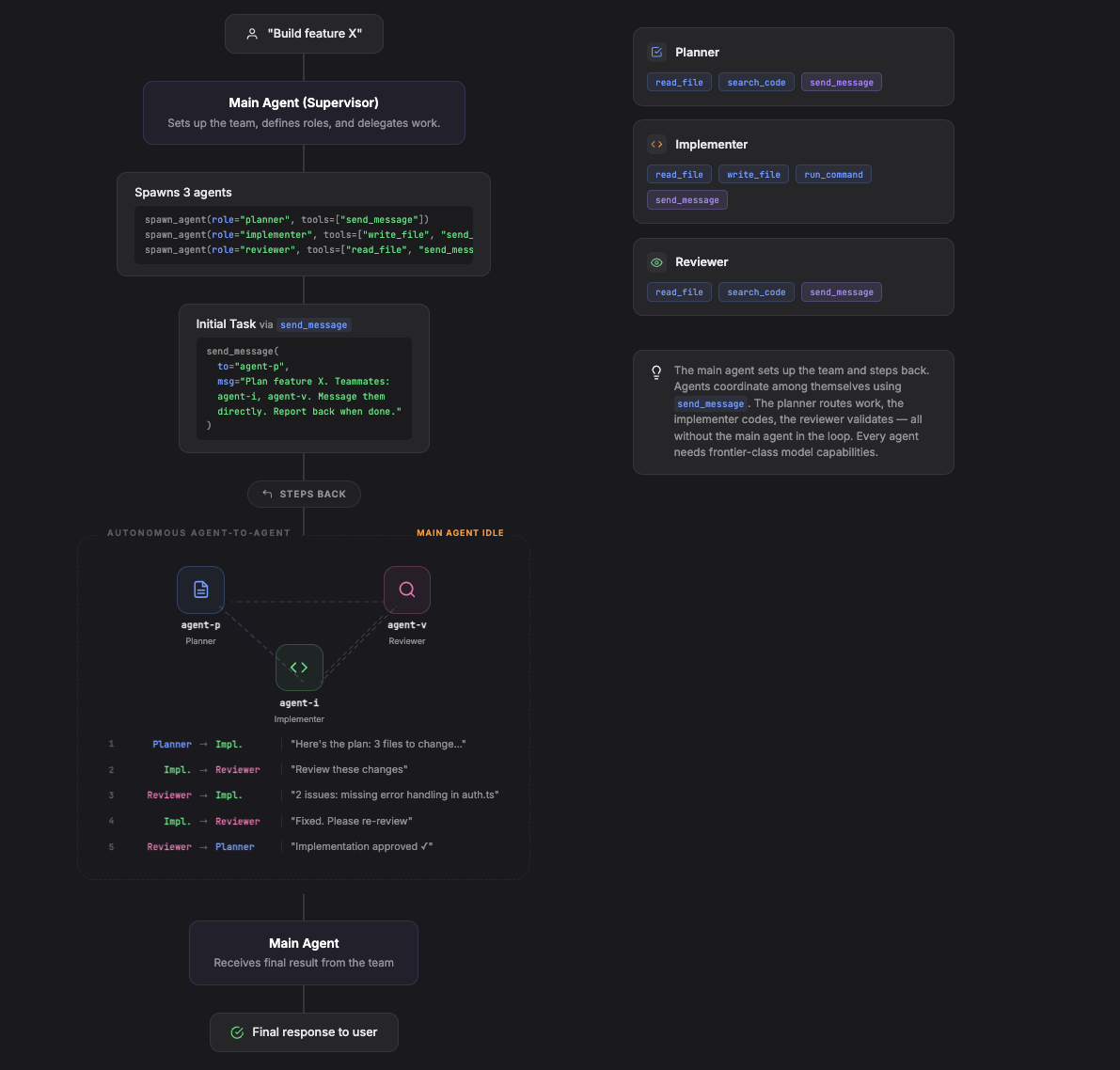
The tool surface includes cross-agent addressing. Each agent gets send_message in its own tool set and can address other agents by name or path.
From the main agent's perspective, the conversation is short. It sets up the team, kicks off the planner, and waits for the final report. The model can choose to wait silently, or periodically check in using list_agents:
[
  { "role": "user", "content": "Build feature X" },

  { "role": "assistant", "tool_calls": [
    { "name": "spawn_agent", "arguments": { "role": "planner", "tools": ["read_file", "search_code", "send_message"] } },
    { "name": "spawn_agent", "arguments": { "role": "implementer", "tools": ["read_file", "write_file", "run_command", "send_message"] } },
    { "name": "spawn_agent", "arguments": { "role": "reviewer", "tools": ["read_file", "search_code", "send_message"] } }
  ]},
  { "role": "tool", "name": "spawn_agent", "content": "Spawned agent-p (planner)" },
  { "role": "tool", "name": "spawn_agent", "content": "Spawned agent-i (implementer)" },
  { "role": "tool", "name": "spawn_agent", "content": "Spawned agent-v (reviewer)" },

  { "role": "assistant", "tool_calls": [{ "name": "send_message", "arguments": { "to": "agent-p", "message": "Plan and coordinate feature X. Your teammates: agent-i (implementer), agent-v (reviewer). Message them directly. Report back to me when done." } }]},
  { "role": "tool", "name": "send_message", "content": "Delivered to agent-p" },

  { "role": "assistant", "tool_calls": [{ "name": "wait_agent", "arguments": { "timeout": 60 } }]},
  { "role": "tool", "name": "wait_agent", "content": "Timed out. No agents responded." },

  { "role": "assistant", "tool_calls": [{ "name": "list_agents", "arguments": {} }]},
  { "role": "tool", "name": "list_agents", "content": "agent-p: running, agent-i: running, agent-v: idle" },

  { "role": "assistant", "tool_calls": [{ "name": "wait_agent", "arguments": { "timeout": 120 } }]},
  { "role": "tool", "name": "wait_agent", "content": "agent-p responded: Feature X complete. 3 files changed, all tests passing. Summary: ..." },

  { "role": "assistant", "content": "Feature X is built. Here's what was done..." }
]
The planner messaging the implementer, the implementer sending code to the reviewer, the reviewer requesting fixes — all of that happens inside the agents' own conversations. The main agent's context stays clean. The model checked in with list_agents after a timeout. It could have called wait_agent with no timeout and blocked until completion.
The main agent collects results only when an agent explicitly messages back (here, the planner reports completion). Everything else is invisible to it. Implementations vary in how cross-agent addressing works: hierarchical paths (/root/planner to /root/implementer), file-based mailboxes, or IPC protocols.
When to use this: Large tasks where the coordination logic exceeds what a single agent can manage step-by-step.
Limitations: Every agent in the team needs frontier-class model capabilities, not just the main agent. Each team member must independently decide when to message teammates, what to include, and when to report back. Models can message the wrong agent, forget to report completion, or get stuck in loops. Beyond model capability, there are infrastructure challenges: cycle detection (A waits on B, B waits on A), conflict resolution (two agents edit the same file), and shutdown coordination. Debugging is hard because message chains between agents are difficult to trace and failures cascade.
Choosing a Pattern
| Pattern | Tools | Main Agent Role | Agent Lifetime |
|---|---|---|---|
| Inline Tool | call_agent | Caller | Single task |
| Fan-Out | spawn_agent, wait_agent | Dispatcher | Single task |
| Agent Pool | spawn, send, wait, list, kill | Coordinator | Multi-turn |
| Teams | All above + cross-agent send_message | Supervisor | Persistent |
Start with Pattern 1. Most tasks that feel like they need a multi-agent system work fine with a well-prompted inline tool call. Move to Pattern 2 for genuinely independent parallel work. Move to Pattern 3 when agents need to collaborate across multiple steps. Pattern 4 is for when coordination logic exceeds what a single agent can manage.
Each step up requires a more capable model. Pattern 1 works with any model that can call tools. Pattern 2 needs a model that reasons about when to wait. Pattern 3 needs a model that tracks multi-agent state across turns. Pattern 4 needs frontier models for every agent. With a smaller or cheaper model, stay with Pattern 1 or 2.
Result collection also changes across patterns. Pattern 1 returns results inline as a tool response. Pattern 2 batches results via wait_agent. Pattern 3 delivers results incrementally. Pattern 4 surfaces only what agents explicitly report back; everything else stays inside inter-agent conversations.
For patterns 2-4, spawn_agent always returns immediately and wait_agent collects results when the model decides to call it. The framework provides the tools. The model controls the orchestration. A task that takes 4 coordinated agents today may be solvable by a single agent with a better model tomorrow.