
Getting Started with Gemini Deep Research API
This guide demonstrates how to use the new Gemini Deep Research agent via the Interactions API to perform complex research tasks, generate images based on the findings, and translate the results.
Preview: The Gemini Deep Research Agent is currently in preview. The Deep Research agent is exclusively available using the Interactions API. You cannot access it through generate_content.
!uv pip install google-genai --upgradeimport time
from google import genai
from IPython.display import display, Markdown
client = genai.Client()1. Basic Research Task (Polling)
The following example shows how to start a research task in the background and poll for results. This is the standard way to interact with the Deep Research agent.
prompt = "Research the history of Google TPUs."

interaction = client.interactions.create(
    agent='deep-research-pro-preview-12-2025',
    input=prompt,
    background=True
)

print(f"Research started: {interaction.id}")
# Poll for results
while True:
    interaction = client.interactions.get(interaction.id)
    if interaction.status == "completed":
        print(f"Research completed: {interaction.id}")
        break
    elif interaction.status == "failed":
        print(f"Research failed: {interaction.error}")
        break

    print(".", end="", flush=True)
    time.sleep(10)


display(Markdown(interaction.outputs[-1].text))
# The Evolution of Google Tensor Processing Units: A Historical and Architectural Analysis
### Key Points
* **Origins in Necessity:** The Tensor Processing Unit (TPU) project was initiated in 2013 when Google engineers realized that existing CPU and GPU infrastructure could not sustain the computational demands of ubiquitous voice search and deep learning applications without doubling datacenter footprints.
* **Architectural Paradigm Shift:** Unlike the Von Neumann architecture of CPUs, TPUs utilize a **systolic array** architecture. This design mimics the flow of blood through the heart, allowing data to flow through thousands of arithmetic logic units (ALUs) without accessing memory for intermediate results, drastically increasing efficiency for matrix multiplications.
...2. Advanced Research Task (Streaming, Thinking, Promoting)
Deep Research supports streaming to receive real-time updates on the research progress (thinking_summaries). You can steer the agent's output by providing specific promting instructions.
# Define a complex prompt with formatting instructions
prompt = """
Research the history and future developments of the Google TPUs.

Focus on:
1.  Key technological breakthroughs in the last 12 months.
2.  Major competitors and their projected timelines for mass production.
3.  Future developments and plans for 2026 and beyond

Format the output:
- as a strategic briefing document for an developer educating themselves about the Google TPU landscape.
- Include a table comparing the top 3 leading companies.
- Use short concise sentence and bullet points.
"""


stream = client.interactions.create(
    agent="deep-research-pro-preview-12-2025",
    input=prompt,
    background=True,
    stream=True,
    agent_config={
        "type": "deep-research",
        "thinking_summaries": "auto"
    }
)

interaction_id = None
last_event_id = None
report = ""

for chunk in stream:
    if chunk.event_type == "interaction.start":
        interaction_id = chunk.interaction.id
        print(f"Interaction started: {interaction_id}")

    if chunk.event_id:
        last_event_id = chunk.event_id

    if chunk.event_type == "content.delta":
        if chunk.delta.type == "text":
            report += chunk.delta.text
        elif chunk.delta.type == "thought_summary":
            print(f"{chunk.delta.content.text}\n", flush=True)

    elif chunk.event_type == "interaction.complete":
        print(chunk)
        print("\nResearch Complete")


prev_ia = client.interactions.get(interaction_id)
print(prev_ia)

display(Markdown(report))
Full Report: https://gist.github.com/philschmid/68c5afacfd3a3555ca834ba27415ba88
3. Combine Deep Research Interaciton with Model Interactions
The Interactions API supports stateful interactions, which allows you to continue the conversation after the agent returns the final report by using the previous_interaction_id.
You can continue the conversation after the agent returns the final report using a model to visualize the results using Nano Banana Pro or translate the results using Gemini Flash.
import base64
from IPython.display import Image

print("Generating image...")
image_interaction = client.interactions.create(
    model="gemini-3-pro-image-preview",
    input="Visluaize the report ino a timeline slide",
    previous_interaction_id=interaction_id,
)

image_data = [data for data in image_interaction.outputs if data.type == "image"]

for output in image_data:
    image_data = base64.b64decode(output.data)
    display(Image(data=image_data))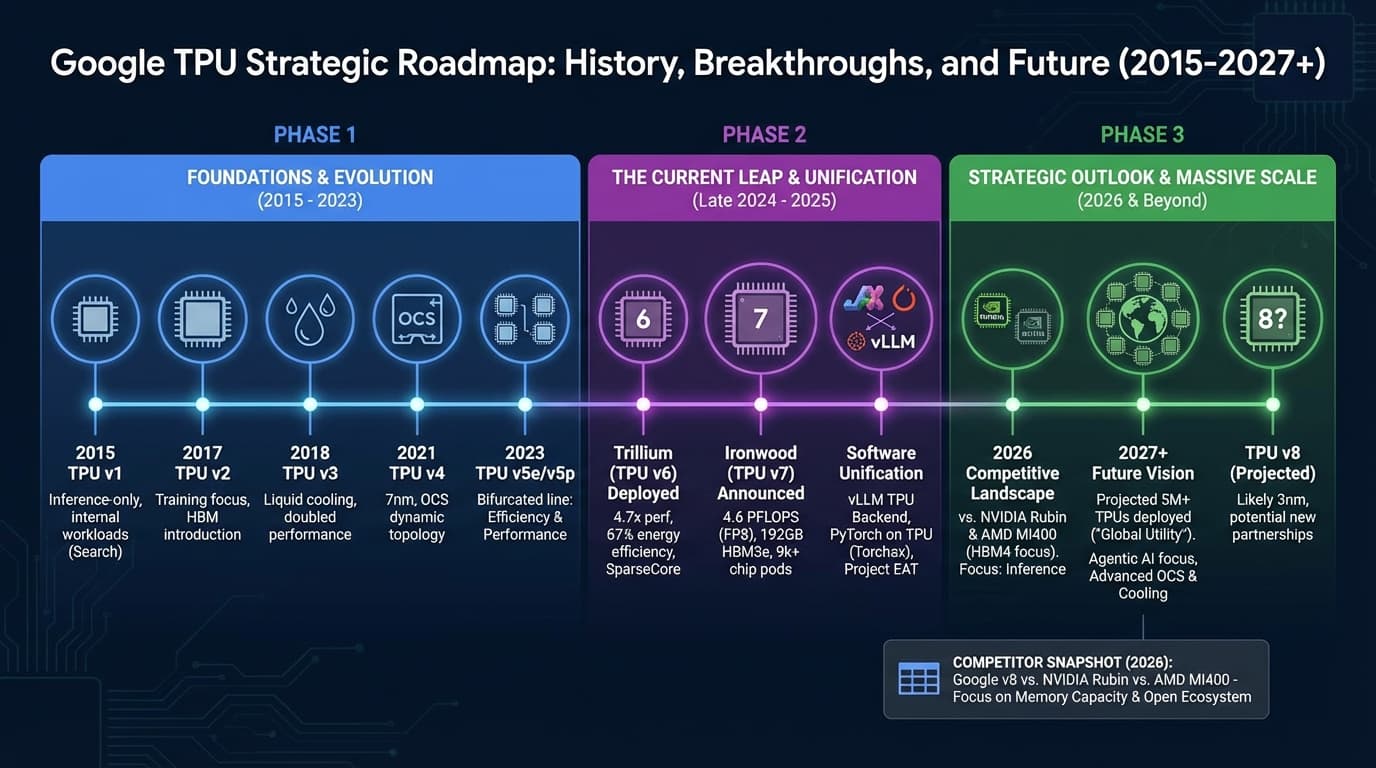
print("Translating...")
translate_interaction = client.interactions.create(
    model="gemini-3-flash-preview",
    input="Translate the report into simple German.",
    previous_interaction_id=interaction_id,
)

display(Markdown(translate_interaction.outputs[-1].text))
# Strategischer Bericht: Die Google TPU-Landschaft
## Zusammenfassung
Google beschleunigt die Entwicklung eigener KI-Chips (TPUs), um NVIDIA herauszufordern. Die letzten 12 Monate brachten mit **Trillium (v6)** und **Ironwood (v7)** große Fortschritte. Für Entwickler wird es einfacher: Dank neuer Software-Tools laufen PyTorch-Modelle jetzt fast ohne Änderungen auf TPUs. Bis 2027 will Google über 5 Millionen TPUs im Einsatz haben.
... This API is in Beta, and we want your feedback! We're actively listening to developers to shape the future of this API. What features would help your agent workflows? What pain points are you experiencing? Please let me know on Twitter or LinkedIn.