
Building Agents with the Gemini Interactions API
Alternative Version: This guide uses the Interactions API (Beta). For the
GenerateContentAPI approach, see Building Agents with Gemini 3.
It seems complicated, when you watch an AI agent edit multiple files, run commands, handle errors, and iteratively solve a problem, it feels like magic. But it isn't. The secret to building an agent is that there is no secret.
The core of an Agent is surprisingly simple: It is a Large Language Model (LLM) running in a loop, equipped with tools it can choose to use.
If you can write a loop in Python, you can build an agent. This guide walks you through building a CLI Agent using the Interactions API, which handles conversation state on the server so you don't have to.
What actually is an Agent?
Traditional software workflows are prescriptive and follow predefined paths (Step A -> Step B -> Step C), Agents are System that uses an LLM to dynamically decide the control flow of an application to achieve a user goal.
An agent generally consists of these core components:
- The Model (Brain): The reasoning engine, in our case a Gemini model. It reasons through ambiguity, plans steps, and decides when it needs outside help.
- Tools (Hands and Eyes): Functions the agent can execute to interact with the outside world/environment (e.g., searching the web, reading a file, calling an API).
- Context/Memory (Workspace): The information the agent has access to at any moment. Managing this effectively, known as Context Engineering.
- The Loop (Life): A
whileloop that allows the model to: Observe → Think → Act → Observe again, until the task is complete.
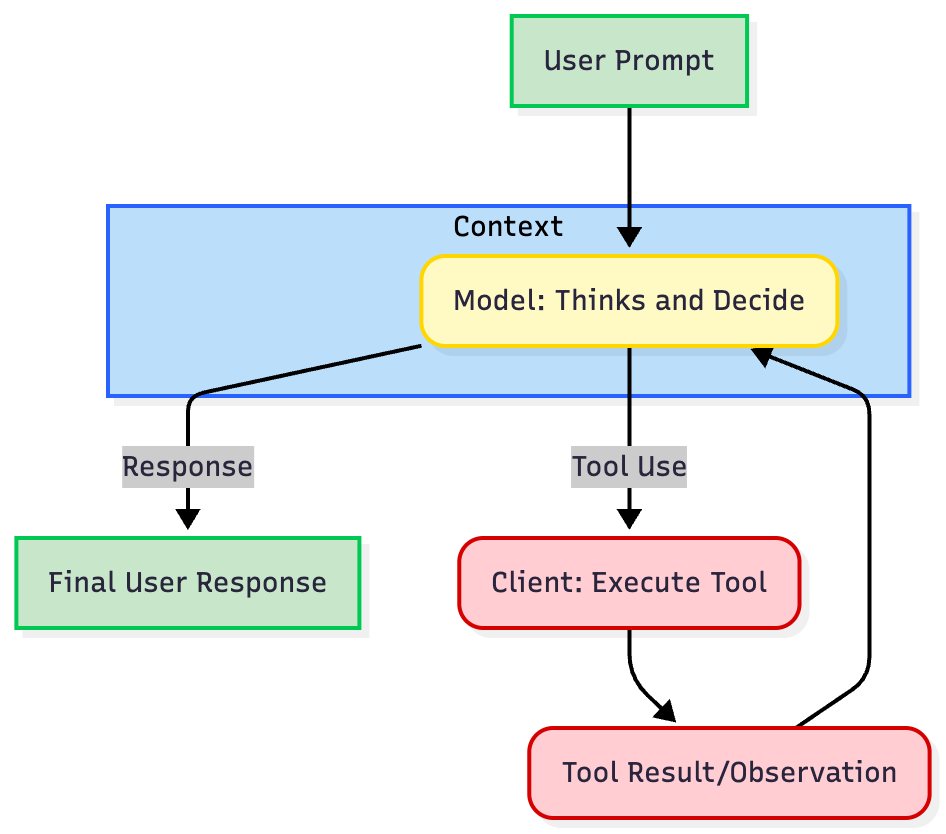
"The Loop" of nearly every agent is an iterative process:
- Define Tool Definitions: You describe your available tools (e.g.,
get_weather) to the model using a structured format. - Call the LLM: You send the user's prompt and the tool definitions to the model.
- Model Decision: The model analyzes the request. If a tool is needed, it returns a structured
tool usecontaining the tool name and arguments. - Execute Tool (Client Responsibility): The client/application code intercepts this
tool use, executes the actual code or API call, and captures the result. - Respond and Iterate: You send the result (the
tool response) back to model. The model uses this new information to decide the next step, either calling another tool or generating the final response.
The new Interactions API simplifies this loop by managing the conversation state on the server, so you don't have to manually track history.
Why Interactions API?
- Server-side state: Use
previous_interaction_idinstead of re-sending history - Automatic thought signatures: No manual management required
- Unified interface: Same API for models and agents (like Deep Research)
Currently in Beta. See the official documentation for details.
Building an Agent
Let's build an agent step-by-step, progressing from basic text generation to a functional CLI agent using Gemini 3 Flash and the Interactions API.
Prerequisites: Install the SDK (pip install google-genai) and set your GEMINI_API_KEY environment variable (Get it in AI Studio).
Step 1: Basic Text Generation and Abstraction
The first step is to create a baseline interaction with the LLM, for us Gemini 3 Flash. We are going to create a simple Agent class abstraction to structure our code, which we will extend throughout this guide. We will first start with a simple chatbot that maintains a conversation history using the Interactions API's server-side state.
from google import genai

class Agent:
    def __init__(self, model: str):
        self.model = model
        self.client = genai.Client()
        self.last_interaction_id = None

    def run(self, contents: str):
        response = self.client.interactions.create(
            model=self.model,
            input=contents,
            previous_interaction_id=self.last_interaction_id
        )
        self.last_interaction_id = response.id
        return response

agent = Agent(model="gemini-3-flash-preview")
response1 = agent.run(
    contents="Hello, What are top 3 cities in Germany to visit? Only return the names of the cities."
)

print(f"Model: {response1.outputs[-1].text}")
# Output: Berlin, Munich, Cologne
response2 = agent.run(
    contents="Tell me something about the second city."
)

print(f"Model: {response2.outputs[-1].text}")
# Output: Munich is the capital of Bavaria and is known for its Oktoberfest.
This is not an agent yet. It is a standard chatbot. It maintains state but cannot take action, has no "hands or eyes".
Step 2: Giving it Hands & Eyes (Tool Use)
To start turning this an agent, we need Tool Use or Function Calling. We provide the agent with tools. This requires defining the implementation (the Python code) and the definition (the schema the LLM sees). If the LLM believes that tool will help solve a user's prompt, it will return a structured request to call that function instead of just text.
We are going to create 3 tools, read_file, write_file, and list_dir. A tool Definition is a JSON schema that defines the name, description, and parameters of the tool, wrapped in a structure the Interactions API understands.
Best Practice: Use the description fields to explain when and how to use the tool. The model relies heavily on these to understand when and how to use the tool. Be explicit and clear.
import os
import json

read_file_tool = {
    "type": "function",
    "name": "read_file",
    "description": "Reads a file and returns its contents.",
    "parameters": {
        "type": "object",
        "properties": {
            "file_path": {
                "type": "string",
                "description": "Path to the file to read.",
            }
        },
        "required": ["file_path"],
    },
}

list_dir_tool = {
    "type": "function",
    "name": "list_dir",
    "description": "Lists the contents of a directory.",
    "parameters": {
        "type": "object",
        "properties": {
            "directory_path": {
                "type": "string",
                "description": "Path to the directory to list.",
            }
        },
        "required": ["directory_path"],
    },
}

write_file_tool = {
    "type": "function",
    "name": "write_file",
    "description": "Writes a file with the given contents.",
    "parameters": {
        "type": "object",
        "properties": {
            "file_path": {
                "type": "string",
                "description": "Path to the file to write.",
            },
            "contents": {
                "type": "string",
                "description": "Contents to write to the file.",
            },
        },
        "required": ["file_path", "contents"],
    },
}

def read_file(file_path: str) -> dict:
    with open(file_path, "r") as f:
        return f.read()

def write_file(file_path: str, contents: str) -> bool:
    """Writes a file with the given contents."""
    with open(file_path, "w") as f:
        f.write(contents)
    return True

def list_dir(directory_path: str) -> list[str]:
    """Lists the contents of a directory."""
    full_path = os.path.expanduser(directory_path)
    return os.listdir(full_path)

file_tools = {
    "read_file": {"definition": read_file_tool, "function": read_file},
    "write_file": {"definition": write_file_tool, "function": write_file},
    "list_dir": {"definition": list_dir_tool, "function": list_dir},
}
Now we integrate the tools and function calls into our Agent class.
from google import genai

class Agent:
    def __init__(self, model: str, tools: dict):
        self.model = model
        self.client = genai.Client()
        self.last_interaction_id = None
        self.tools = tools

    def run(self, contents: str):
        response = self.client.interactions.create(
            model=self.model,
            input=contents,
            tools=[tool["definition"] for tool in self.tools.values()],
            previous_interaction_id=self.last_interaction_id
        )
        self.last_interaction_id = response.id
        return response

agent = Agent(model="gemini-3-flash-preview", tools=file_tools)

response = agent.run(
    contents="Can you list my files in the current directory?"
)
for output in response.outputs:
    if output.type == "function_call":
        print(f"Function call: {output.name} with arguments {output.arguments}")
# Output: Function call: list_dir with arguments {'directory_path': '.'}
Great! The model has successfully called the tool. Now, we need to add the tool execution logic to our Agent class and the loop return the result back to the model.
Step 3: Closing the Loop (The Agent)
An Agent isn't about generating one tool call, but about generating a series of tool calls, returning the results back to the model, and then generating another tool call, and so on until the task is completed.
The Agent class handles the core loop: intercepting the function_call, executing the tool on the client side, and sending back the function_result using the previous_interaction_id to maintain context. Instead of manually re-sending the entire conversation history, the Interactions API uses previous_interaction_id to chain interactions. The server maintains the context, so you only need to send new inputs (user messages or tool results).
# ... Code for the tools and tool definitions from Step 2 should be here ...

from google import genai

class Agent:
    def __init__(self, model: str, tools: dict, system_instruction: str = "You are a helpful assistant."):
        self.model = model
        self.client = genai.Client()
        self.last_interaction_id = None
        self.tools = tools
        self.system_instruction = system_instruction

    def run(self, contents: str | list):
        response = self.client.interactions.create(
            model=self.model,
            input=contents,
            system_instruction=self.system_instruction,
            tools=[tool["definition"] for tool in self.tools.values()],
            previous_interaction_id=self.last_interaction_id
        )
        self.last_interaction_id = response.id

        tool_results = []
        for output in response.outputs:
            if output.type == "function_call":
                print(f"[Function Call] {output.name}({output.arguments})")

                if output.name in self.tools:
                    result = self.tools[output.name]["function"](**output.arguments)
                else:
                    result = "Error: Tool not found"

                print(f"[Function Response] {result}")
                tool_results.append({
                    "type": "function_result",
                    "call_id": output.id,
                    "name": output.name,
                    "result": str(result)
                })

        # If there were tool calls, send results back to the model
        if tool_results:
            return self.run(tool_results)

        return response

agent = Agent(
    model="gemini-3-flash-preview",
    tools=file_tools,
    system_instruction="You are a helpful Coding Assistant. Respond like you are Linus Torvalds."
)

response = agent.run(
    contents="Can you list my files in the current directory?"
)
print(response.outputs[-1].text)
# Output: [Function Call] list_dir({'directory_path': '.'})
# [Function Response] ['.venv', ... ]
# There. Your current directory contains: `LICENSE`,
Congratulations. You just built your first functioning agent using the Interactions API.
Phase 4: Multi-turn CLI Agent
Now we can run our agent in a simple CLI loop. It takes surprisingly little code to create highly capable behavior.
# ... Code for the Agent, tools and tool definitions from Step 3 should be here ...

agent = Agent(
    model="gemini-3-flash-preview",
    tools=file_tools,
    system_instruction="You are a helpful Coding Assistant. Respond like you are Linus Torvalds."
)

print("Agent ready. Ask it to check files in this directory.")
while True:
    user_input = input("You: ")
    if user_input.lower() in ['exit', 'quit']:
        break

    response = agent.run(user_input)
    print(f"Linus: {response.outputs[-1].text}\n")
Conclusion
Building an agent is no longer magic; it is a practical engineering task. As we've shown, you can build a working prototype in under 100 lines of code.
The Interactions API is designed to make agent development even simpler. Our goal is to provide a unified, developer-friendly interface that handles the complexity of state management, tool orchestration, and long-running tasks—so you can focus on building great agent experiences.
We believe a cleaner, more consistent API foundation enables the broader ecosystem to thrive, and open source libraries, frameworks, and tooling can build more powerful abstractions on top. Making it easier for developers at every level to build with Gemini.
This API is in Beta, and we want your feedback! We're actively listening to developers to shape the future of this API. What features would help your agent workflows? What pain points are you experiencing? Let us know.
Thanks for reading! If you have any questions or feedback, please let me know on Twitter or LinkedIn.